 arithmos
MAKE THE MATHEMATICS YOURSELF
Hilbert’s binary labyrinth in C
A complete program. Standard C, a compiler, and the rule behind the shape.
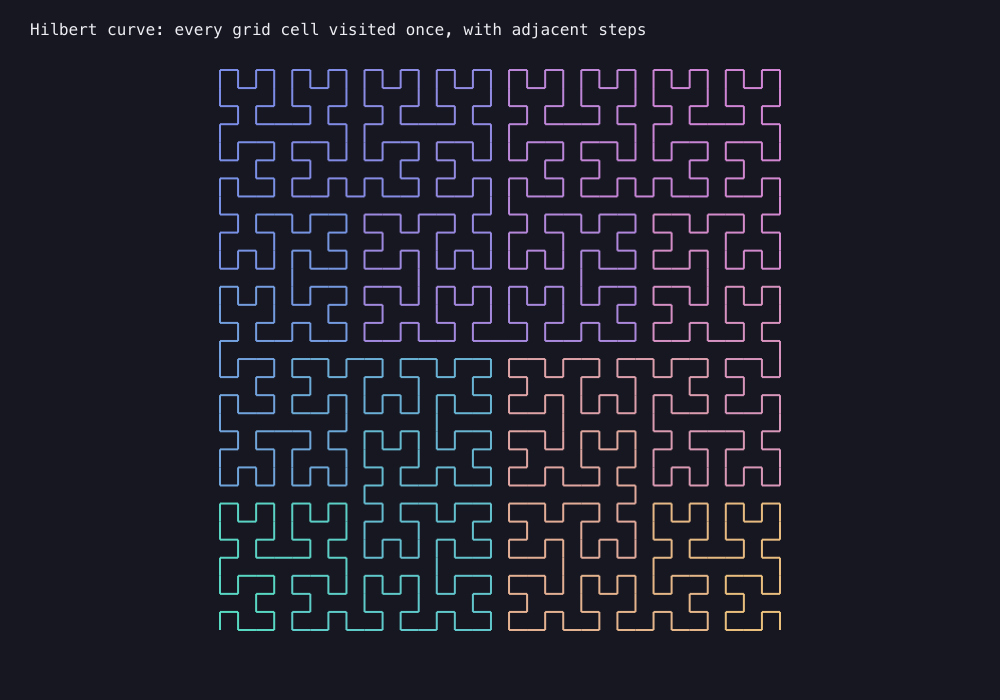
FROM SOURCE TO SHAPE
Run it in three steps.
- Save the source.
Download geo-hilbert.c into a folder on your computer.
- Compile it.
In that folder, run this with GCC or Clang:
cc -std=c11 -O2 geo-hilbert.c -lm -o geo-hilbert - Make the image.
./geo-hilbertOpen
geo-hilbert.svgin a browser to see the result.
On Windows with GCC, name the executable geo-hilbert.exe and run it from the same folder.
THE RULE IN THE PROGRAM
How the picture is built
Decode base-four digits with recursive rotations and reflections to visit every cell of a power-of-two square grid with adjacent steps.
Make it your own
ORDER = 5, allowed 1..7. Number of vertices is 4^ORDER.
A finite polyline approximates the limiting Hilbert curve; only the infinite limit fills the square. Each run produces one image; use Graphic mode for the interactive animation.
/* Arithmos: geo-hilbert
* Compile: cc -std=c11 -O2 geo-hilbert.c -lm -o geo-hilbert
* Run: ./geo-hilbert
* Output: geo-hilbert.svg (open this file in a browser)
* Optional output path: ./geo-hilbert my-image.svg
* Edit the constants in draw() to explore another case.
*/
#include <math.h>
#include <stdint.h>
#include <stdio.h>
#include <stdlib.h>
#include <string.h>
static FILE *nt_out;
#define NT_PI 3.14159265358979323846
/* The small SVG writer keeps this program free of graphics dependencies.
* Coordinates are pixels on a 1000 x 700 drawing surface.
* t runs from 0 to 1 through mint, blue, rose, and gold.
*/
static inline void nt_color(double t, char hex[8]) {
const double stops[4][3] = {
{91,227,201}, {128,146,240}, {218,138,220}, {244,200,127}
};
t = fmax(0.0, fmin(1.0,t)) * 3.0;
int band = (int)fmin(2.0,floor(t));
double blend = t - band;
int r[3];
for (int k=0;k<3;k++) r[k]=(int)lround(stops[band][k]*(1.0-blend)+stops[band+1][k]*blend);
snprintf(hex,8,"#%02x%02x%02x",r[0],r[1],r[2]);
}
static inline void nt_line(double x,double y,double X,double Y,double t,double alpha,double width) {
char color[8];nt_color(t,color);
fprintf(nt_out,"<path d=\"M%.3f %.3f L%.3f %.3f\" fill=\"none\" stroke=\"%s\" stroke-opacity=\"%.3f\" stroke-width=\"%.3f\"/>\n",x,y,X,Y,color,alpha,width);
}
static inline void nt_dot(double x,double y,double r,double t,double alpha) {
char color[8];nt_color(t,color);
fprintf(nt_out,"<circle cx=\"%.3f\" cy=\"%.3f\" r=\"%.3f\" fill=\"%s\" fill-opacity=\"%.3f\"/>\n",x,y,r,color,alpha);
}
static inline void nt_circle(double x,double y,double r,double t,double alpha,double width) {
char color[8];nt_color(t,color);
fprintf(nt_out,"<circle cx=\"%.3f\" cy=\"%.3f\" r=\"%.3f\" fill=\"none\" stroke=\"%s\" stroke-opacity=\"%.3f\" stroke-width=\"%.3f\"/>\n",x,y,r,color,alpha,width);
}
static inline void nt_rect(double x,double y,double w,double h,double t,double alpha) {
char color[8];nt_color(t,color);
fprintf(nt_out,"<rect x=\"%.3f\" y=\"%.3f\" width=\"%.3f\" height=\"%.3f\" fill=\"%s\" fill-opacity=\"%.3f\"/>\n",x,y,w,h,color,alpha);
}
static inline void nt_text(double x,double y,const char *text) {
fprintf(nt_out,"<text x=\"%.3f\" y=\"%.3f\" fill=\"#ededf3\" font-family=\"monospace\" font-size=\"16\">",x,y);
for (;*text;text++) {
if (*text=='&') fputs("&",nt_out);
else if (*text=='<') fputs("<",nt_out);
else if (*text=='>') fputs(">",nt_out);
else fputc(*text,nt_out);
}
fputs("</text>\n",nt_out);
}
static inline int nt_gcd(int a,int b) {a=abs(a);b=abs(b);while(b){int r=a%b;a=b;b=r;}return a;}
static inline int nt_prime(int n) {if(n<2)return 0;for(int d=2;d<=n/d;d++)if(n%d==0)return 0;return 1;}
/* Edit ORDER (1..7). The grid has 2^ORDER cells along each side. */
static void hilbert_xy(int side,int d,int *xx,int *yy) {
int x=0,y=0,t=d;
for(int s=1;s<side;s*=2) {
int rx=1&(t>>1),ry=1&(t^rx);
if(!ry){if(rx){x=s-1-x;y=s-1-y;}int u=x;x=y;y=u;}
x+=s*rx;y+=s*ry;t>>=2;
}
*xx=x;*yy=y;
}
static void draw(void) {
const int ORDER=5;
int side=1<<ORDER,count=side*side,px=0,py=0;
double s=560.0/(side-1);
for(int d=0;d<count;d++) {
int x,y;hilbert_xy(side,d,&x,&y);
if(d)nt_line(220+s*px,630-s*py,220+s*x,630-s*y,(double)d/(count-1),.95,2);
px=x;py=y;
}
nt_text(30,35,"Hilbert curve: every grid cell visited once, with adjacent steps");
}
int main(int argc, char **argv) {
if (argc > 2) {
fprintf(stderr, "Usage: %s [OUTPUT.svg]\n", argv[0]);
return EXIT_FAILURE;
}
const char *filename = argc == 2 ? argv[1] : "geo-hilbert.svg";
nt_out = fopen(filename, "wb");
if (!nt_out) { perror(filename); return EXIT_FAILURE; }
fputs("<svg xmlns=\"http://www.w3.org/2000/svg\" width=\"1000\" height=\"700\" viewBox=\"0 0 1000 700\">\n"
"<rect width=\"1000\" height=\"700\" fill=\"#171721\"/>\n", nt_out);
draw();
fputs("</svg>\n", nt_out);
int failed = ferror(nt_out);
if (fclose(nt_out) != 0) failed = 1;
if (failed) { fputs("Could not finish writing the image.\n", stderr); return EXIT_FAILURE; }
printf("Wrote %s\n", filename);
return EXIT_SUCCESS;
}
All 40 explorations, ready to compile.Download all C examples ↓